How to Enter Survey Number in TNREGINET Online | Tamil Nadu
The TNREGINET portal is the official online platform managed by the Government of Tamil Nadu Registration Department. It allows citizens to check land records, property registration details, and encumbrance certificates online.
Many land owners and buyers use this portal to verify property information before buying land. One common task is searching property records using a survey number. This guide explains how to enter survey number in TNREGINET online and how to check property information step by step.
The guide also explains how to find survey numbers, view EC online, and verify land ownership through the registration department website.
What Is a Survey Number in Land Records
A survey number is a unique identification number assigned to a piece of land during the land survey process. Government survey departments use this number to identify land parcels in official records.
Each land record may also include a subdivision number if the original land parcel has been divided into smaller sections.
Survey numbers help maintain accurate land registration, property verification, and taxation records. When you know how to enter survey number in TNREGINET, the system will display all related land information.
This information may include
• Owner details
• Land classification
• Village and taluk information
• Patta Chitta land record details
• Registration history
Because of this, the survey number plays a major role in property verification in Tamil Nadu.
Step by Step Guide to Enter Survey Number in TNREGINET
This step by step guide to enter survey number in TNREGINET will help you find land records quickly.
Step 1: Open the Registration Department Website
Visit the official TNREGINET portal. This is the online registration department website used for land registration services in Tamil Nadu.
Step 2: Go to the Land Records Section
On the homepage, find the option related to land records or property services. The portal provides several search options including
• guideline value search
• encumbrance certificate search
• property details search
Choose the option that allows tnreginet land records search.
Step 3: Select District and Taluk
Choose the district, taluk, and village where the property is located. These details help the system identify the correct land record database.
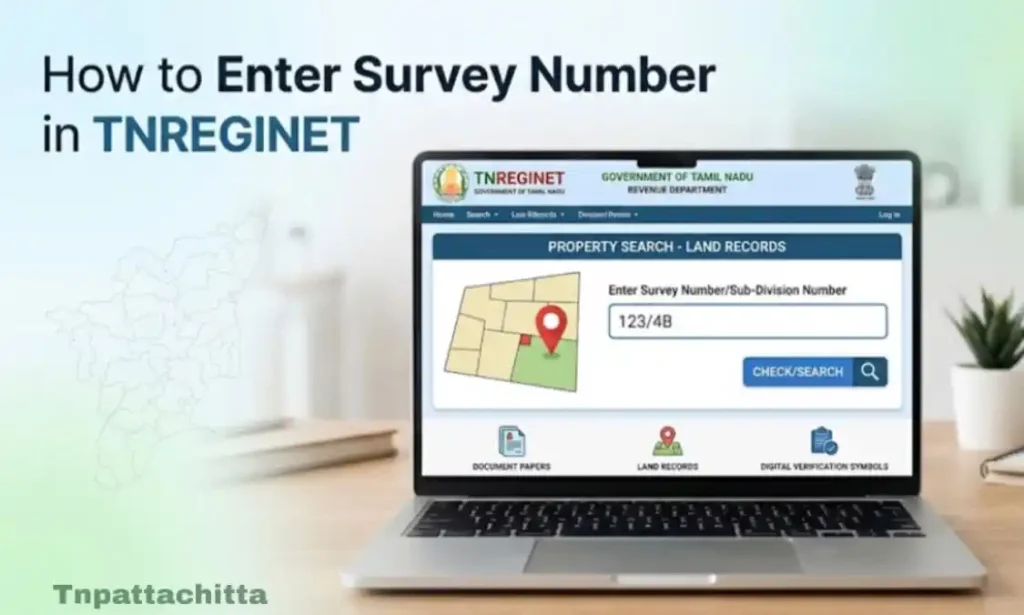
Step 4: Enter Survey Number
Enter the survey number in the search field. If the property has subdivisions, enter the correct subdivision number as well.
This step completes the tnreginet survey number search process.
Step 5: Submit the Search
Click the search button. The portal will display the property details linked to that survey number.
This is the simplest way to know how to enter survey number in TNREGINET without visiting the sub registrar office.
How to Check Property Details Using Survey Number TNREGINET
Once you enter the survey number, the portal shows the property record connected to that number.
This allows users to
• check land ownership
• verify property registration history
• confirm land classification
• perform tnreginet property verification Tamil Nadu
This search protects buyers from fraud and ownership disputes. Knowing how to enter survey number in TNREGINET ensures accurate verification.
TNREGINET Property Details by Survey Number Guide
This TNREGINET property details by survey number guide explains what information appears after the search.
The system may display
• survey number
• subdivision number
• village name
• land area
• owner name
• land type
• registration details
These records help users perform a complete tnreginet property details search before property purchase.
Many banks and legal advisors also request these records during loan processing and property verification.
TNREGINET Encumbrance Certificate Search
An encumbrance certificate shows whether a property has any legal liabilities such as loans or mortgages.
The TNREGINET portal provides an option to perform tnreginet encumbrance certificate search.
This allows users to complete online EC view Tamilnadu Tamil TNREGINET without visiting the registrar office, an important part of how to enter survey number in TNREGINET for legal verification.
Steps to View EC Online Tamilnadu TNREGINET
- Visit the TNREGINET website
- Open the EC search section
- Select EC search by survey number or document number
- Enter property details
- Submit the request
This allows users to complete online EC view Tamilnadu Tamil TNREGINET without visiting the registrar office.
The encumbrance certificate confirms whether the land has pending financial obligations.
TNREGINET Guideline Value Search
The portal also provides a tnreginet guideline value search tool. Guideline value is the minimum property value set by the government for registration purposes.
People check this value before property registration. It helps buyers understand the approximate government price of land in a specific area.
The guideline value depends on
• location
• land type
• nearby infrastructure
• property demand
Checking this value before registration helps avoid incorrect property pricing.
How to Find Survey Number With Name
Sometimes people know the owner name but not the survey number. In such cases they ask how to find survey number with name.
This process usually involves checking land records through local revenue offices or land record portals.
Possible methods include
• checking Patta Chitta land record
• visiting the village administrative office
• searching land records in revenue department databases
These records often link land ownership details with survey numbers.
How to Find Survey Number Without Patta
Many people also search for how to find survey number without patta. Patta is an official land ownership document in Tamil Nadu.
If you do not have a patta copy, you may still find the survey number through
• village land records
• old sale deeds
• local revenue office
• sub registrar office records
In many cases, property buyers obtain this information from the previous owner.
How to Enter Survey Number in TNREGINET in Tamil
Some users prefer accessing the portal in their regional language. The TNREGINET portal supports Tamil language navigation.
Users searching how to enter survey number in tnreginet in tamil can switch the language option on the portal homepage.
Once the language changes to Tamil, the steps remain the same
This helps local users perform tnreginet survey number search online Tamil Nadu easily.
How to Find Land Ownership Using Survey Number TNREGINET
The TNREGINET portal allows users to check property ownership records using survey numbers.
To perform this search
• open land record search
• enter survey number and location
• view property details
This method helps people verify ownership before purchasing land.
It also supports legal property verification during disputes or documentation processes.
How to Find Land Details in TNREGINET
The TNREGINET portal offers multiple search tools for property verification.
Users can perform
• tnreginet land records search
• tnreginet property details search
• tnreginet ec search by survey number
• guideline value search
This helps verify ownership before purchase and supports legal property verification. Mastering how to enter survey number in TNREGINET ensures safe property transactions.ik8.
Common Problems When Entering Survey Number
Sometimes users cannot find results after entering survey numbers. This usually happens because of small mistakes.
Common problems include
• wrong village selection
• incorrect subdivision number
• outdated land records
• typing errors
Always double-check your details when learning how to enter survey number in TNREGINET.
FAQs
How to enter survey number in TNREGINET Tamil Nadu?
Go to the TNREGINET portal, select land records search, enter your district, village, and survey number, then click search.
How to get land details using survey number in Tamil Nadu?
Use the TNREGINET portal, enter the survey number in the property search section, and view the land details online.
How does a survey number look like in Tamil Nadu?
A survey number is a unique numeric identifier assigned to a land parcel, sometimes with a subdivision number (e.g., 123/1).
How can I know my house survey number?
Check your Patta Chitta documents, visit your local revenue office, or use TNREGINET’s property search with your property details.
Conclusion
The TNREGINET portal provides an easy and secure way to check land records in Tamil Nadu. By knowing how to enter survey number in TNREGINET, users can verify property ownership, view EC online, and check property details without visiting the sub registrar office.
The process involves visiting the registration department website, selecting the land records section, entering the correct survey number, and reviewing the results.
Using the TNREGINET system helps citizens perform property verification, check encumbrance certificates, and confirm land ownership without visiting the sub registrar office. This online access improves transparency and helps buyers make safer property decisions.