NRIs Patta Chitta Online: Identity Authentication Guide 2026
You are sitting in Dubai, New Jersey, or Singapore. You own land back home in Coimbatore, Madurai, or somewhere along the ECR in Chennai. And you need to check your NRIs Patta Chitta Online right now.
The good news? You do not need to fly back. Tamil Nadu’s e-Services portal lets you access your land records from anywhere in the world. But there is one step that stops many NRIs cold: identity authentication.
This guide walks you through exactly how to prove who you are, step by step.
What Is Patta Chitta and Why NRIs Need It
Patta is your land ownership title. It is issued by the Tamil Nadu Revenue Department. It shows your name, survey number, land area, and district details.
Chitta is the land classification record. It tells you if the land is wetland (nanjai) or dryland (punjai). Both documents were merged into one digital record in 2015.
Why do NRIs need this? If you own land in places like Tambaram, Pallavaram, Perungalathur, or villages near Tiruchirappalli, you need Patta Chitta to:
- Sell or transfer the land
- Apply for a bank loan against the property
- Check if records match what you actually own
- Resolve boundary or inheritance disputes
- File for mutation after buying property
- NRIs Patta Chitta Online 2026
Without valid Patta Chitta, any transaction hits a wall. And when you are overseas, delays in getting these records can cost you serious time and money.
The Portal NRIs Use: eservices.tn.gov.in
The Tamil Nadu government runs the official e-Services portal at eservices.tn.gov.in. This is where you go to view, download, or apply for Patta Chitta.
For registration-related work like Encumbrance Certificates or property transfers, you use tnreginet.gov.in.
Both portals require identity verification before granting access to sensitive land data. This is especially true after 2025, when the Tamil Nadu government tightened security with mandatory OTP and biometric checks.
How NRI Identity Authentication Works
This is where most people get confused. Let us break it down clearly.
Step 1: Create Your Account on the Portal
Go to eservices.tn.gov.in. Click on the registration or sign-up option.
You will be asked to fill in your:
- Full name (as on your passport or Aadhaar)
- Date of birth
- Mobile number (international numbers are accepted)
- Email address
- Identity document type
- NRIs Patta Chitta Online
This last part is important. You will choose from Aadhaar, PAN card, Voter ID, or Passport. NRIs typically use their Indian passport or Aadhaar for this step.
Step 2: Choose the Right ID Document
This is the core of NRI authentication. NRIs Patta Chitta Online
Option A: Indian Passport
Most NRIs who do not have an active Aadhaar card use their Indian passport. The portal accepts passport numbers for identity verification. Enter the passport number carefully, along with your date of birth and name.
Make sure the name you enter matches the name on the passport exactly. Even a small spelling difference can cause rejection.
Option B: Aadhaar Card
If you have an Aadhaar card linked to an active Indian mobile number, this is the easiest path. The portal sends an OTP to your Aadhaar-linked mobile number. You enter the OTP and your identity is confirmed instantly.
Many NRIs keep an active Indian SIM for exactly this reason. If you have family in Chennai, Madurai, or your native village, they can receive the OTP on your behalf for verification.
Option C: PAN Card
PAN is accepted at TNREGINET for property registration workflows. It is mandatory for property transactions above a certain value. NRIs with a PAN card can use it as a secondary identifier along with their passport.
Step 3: Mobile OTP Verification
After entering your details, the portal sends an OTP to your registered mobile number.
If you used an Indian mobile number, the OTP arrives in seconds. If you are abroad and gave an international number, the OTP still works. Many NRIs confirm this works fine from UAE, UK, US, Canada, and Australia.
Enter the OTP within the time limit (usually 10 minutes). Your account is now verified.
Step 4: Email Activation
Some portal workflows also send a confirmation link to your email. Click it to fully activate your account. This is a one-time step.
Step 5: Log In and Access Your Records
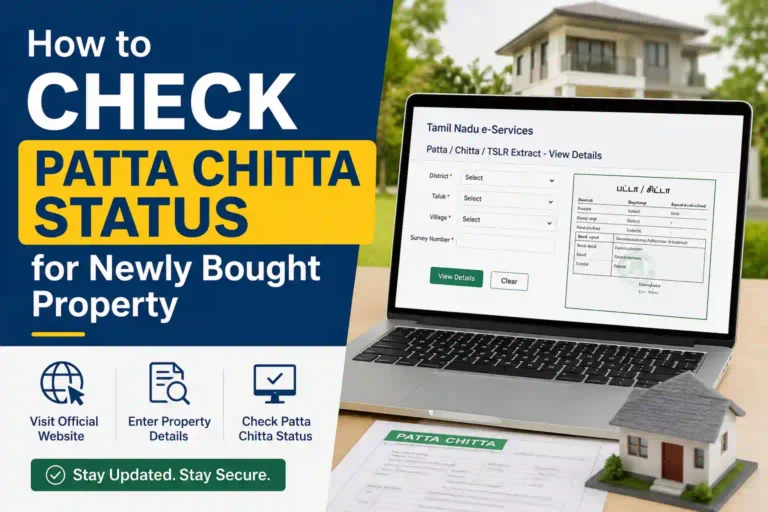
Once your account is active, log in with your username and password. Go to “View Patta & FMB / Chitta / TSLR Extract.” Enter your district, taluk, village, and survey number or Patta number.
The portal then generates your Patta Chitta record as a digitally signed PDF. Download it. The document includes a reference number and authentication value for future use.
Documents NRIs Must Keep Ready
Before you start, gather these:
- Valid Indian passport (current, not expired)
- Aadhaar card copy (if available)
- PAN card
- Property survey number or existing Patta number
- Name of your village, taluk, and district
- Encumbrance Certificate if doing a transfer
For property transfers, you will also need the sale deed copy and recent property tax receipt.
What If Your Aadhaar Is Not Linked to a Mobile Number?
This is a real problem for many long-term NRIs. If you moved abroad years ago and your Aadhaar is not linked to any active number, you cannot use Aadhaar OTP.
Here is what you can do:
Use your Indian passport as the primary ID on the portal instead. Passport-based registration does not require a linked phone number for initial setup. You just need a working email and any phone number to receive the registration OTP.
Alternatively, you can update your Aadhaar mobile number at any Indian Post Office or Aadhaar Seva Kendra near your native place. If you have a trusted family member in towns like Salem, Thanjavur, Erode, or Tirunelveli, they can update this while you are still abroad.
NRI-Specific Challenges and How to Handle Them
Challenge 1: International Mobile Numbers
Not every NRI has an active Indian SIM. The portals do accept international numbers for OTP. If you face issues, use a close family member’s Indian number as the registered mobile for OTP. Confirm with them in advance.
Challenge 2: Name Mismatch
Your name on Aadhaar and passport may differ slightly. For example, initials expanded on one document but not the other. Always use the same document throughout your application. Do not mix Aadhaar name with passport name fields.
Challenge 3: Outdated Address on ID
NRIs living in Sharjah, Kuala Lumpur, or Toronto often have Indian addresses that are years old. This does not affect viewing Patta Chitta. For transfer applications, submit your current overseas address along with your passport copy.
Challenge 4: Power of Attorney for Transfers
If you cannot be physically present and need to apply for a Patta transfer, you can authorise a trusted person through a registered Power of Attorney (POA). The POA holder can appear at the Taluk Office or Sub-Registrar Office on your behalf.
Your POA must be:
- Notarized in your country of residence
- Apostilled if the country is a signatory to the Hague Convention
- Attested at the Indian Embassy or Consulate if it is not
This is a standard legal route used by NRIs across Tamil Nadu, including those with land in districts like Kanchipuram, Vellore, Dindigul, and Tiruppur.
Step-by-Step: View Patta Chitta as an NRI
Here is the complete flow in short steps:
- Go to eservices.tn.gov.in
- Click “View Patta & FMB / Chitta / TSLR Extract“
- Select your district (e.g., Chennai, Coimbatore, Madurai)
- Choose your taluk and village
- Enter your survey number or Patta number
- Enter your mobile number when prompted
- Receive and enter the OTP
- View and download the digitally signed PDF
For simple viewing, you do not always need a full registered account. The OTP step at the point of access is enough.
Step-by-Step: Apply for Patta Transfer as an NRI
Patta transfer is needed when you buy land or inherit property. The steps are more involved:
- Log in at eservices.tn.gov.in with your registered account
- Select “Apply for Patta Transfer“
- Fill in property details (survey number, district, taluk)
- Upload required documents: sale deed, ID proof, EC, tax receipt
- Submit the application
- Note your application reference number
- The VAO (Village Administrative Officer) and Revenue Inspector verify the records
- Track status online using your application ID
- Patta transfer is typically completed in 2 to 3 weeks if records are clear
If you are applying through POA, your authorised person handles steps 2 through 6 in person or online.
How the Tamil Nadu Government Verifies NRI Identity
As of 2026, the Tamil Nadu land records system uses a layered verification approach:
Aadhaar-based OTP or biometric: The most secure layer. Links your Aadhaar number to the transaction record.
Passport-based verification: Your passport number is checked against your submitted details. No biometric is required. Name and date of birth must match exactly.
PAN verification: Used primarily for high-value transactions. The system cross-checks your PAN with the Income Tax Department database.
Document-based verification at Taluk Office: For physical applications or POA cases, the Taluk Office staff verify original documents before processing.
This multi-layer system was strengthened under the New Land Registration Rules 2026 to reduce fraudulent transfers and identity mismatches.
TNREGINET vs eservices.tn.gov.in: Which One for NRIs?
Use eservices.tn.gov.in for: NRIs Patta Chitta Online
- Viewing or downloading Patta Chitta
- Applying for Patta transfer
- Checking FMB sketch and TSLR extract
- Land record verification
Use tnreginet.gov.in for: NRIs Patta Chitta Online
- Property registration and sale deed
- Encumbrance Certificate (EC)
- Stamp duty calculation and payment
- Marriage, birth, death certificates
For most NRIs checking land records, eservices is the right starting point. You will use TNREGINET when you are ready to register or transfer property formally.
Common Questions Ask NRIs Patta Chitta Online
Can I access Patta Chitta from outside India?
Yes. Both portals work globally. You need a stable internet connection and an active email and phone number to receive OTP.
Is the downloaded Patta Chitta legally valid?
Yes. Digitally signed documents from eservices.tn.gov.in are legally valid. They carry a reference number and authentication value that can be verified on the portal.
Do I need an Aadhaar to access Patta Chitta?
No. You can use your Indian passport for registration. Aadhaar makes it easier but is not mandatory for NRIs.
How long does Patta transfer take for NRIs applying remotely?
Typically 2 to 3 weeks if all documents are in order. Delays happen if there are discrepancies in land records or if the VAO requests physical verification.
Can I use my OCI or PIO card?
Currently, the eservices portal primarily accepts Indian ID documents. OCI cards are not listed as a standalone ID option. Use your Indian passport as the preferred document. Confirm with the relevant Taluk Office if your specific case requires additional paperwork.
Key Tips for NRIs Patta Chitta Online
Keep a scanned copy of your Indian passport, Aadhaar, and PAN on a secure cloud folder. You will need them more often than you expect for land-related matters.
Make sure at least one family member in Tamil Nadu has access to your land details, survey numbers, and Patta numbers. This makes remote management much easier.
If your land is in a rural area near towns like Pollachi, Hosur, Rajapalayam, or Sivakasi, check if the local Taluk Office has updated contact information on the TNREGINET portal. Some rural SRO (Sub-Registrar Office) NRIs Patta Chitta Online contacts are useful when OTP-based systems face delays.
Use the Tamil Nadu government helpline at 1800 425 3440 for support with eservices. For TNREGINET issues, the helpline is 044 2858 0202.
Final Thoughts
Patta Chitta authentication for NRIs is not as hard as it sounds. NRIs Patta Chitta Online: The Tamil Nadu government has genuinely built a system that works from abroad. You need the right ID, the right mobile number for OTP, and the right survey or Patta number.
The biggest delays happen when documents have name mismatches or when Aadhaar is not linked to any number. Fix those early. Keep your passport updated. And for any transfer or mutation, a registered Power of Attorney saves you from having to book a flight home.
Your land is yours. Claim it, verify it, and protect it from wherever you are in the world.
Sources: Tamil Nadu e-Services Portal (eservices.tn.gov.in), TNREGINET Portal (tnreginet.gov.in), NRIs Patta Chitta OnlineTamil Nadu Revenue Department, Commissionerate of Survey and Settlement.